enterprise risk management (ERM)

What is enterprise risk management?
Enterprise risk management (ERM) is the process of planning, organizing, directing and controlling the activities of an organization to minimize the harmful effects of risk on its capital and earnings. Enterprise risk management can include financial, strategic and operational risks as well as risks associated with accidental losses.
ERM is an organization-wide strategy enacted to identify and prepare for potential hazards. Because risk management requires the understanding and analysis of the possible risks an organization might face, the ERM process must be proportionate to the size or complexity of the organization. ERM is designed to manage and identify risks across an organization and its extended networks.
ERM is a holistic approach to managing risk, which requires a broad management-based approach. This means that instead of individual business units managing the risk, a company-wide approach is preferred.
ERM standards have been formalized through frameworks such as the Committee of Sponsoring Organizations (COSO), an industry group that maintains and updates ERM standards.
This article is part of
What is risk management and why is it important?
Industry or government regulatory bodies and investors can closely scrutinize enterprises' risk management policies and procedures. In an increasing number of industries, boards of directors are required to review and report on the adequacy of risk management processes in their organizations.
Why is enterprise risk management important?
An ERM program can help increase awareness of business risks across an entire organization, instill confidence in strategic objectives, improve compliance with regulatory and internal mandates, and enhance operational efficiency through more consistent applications of processes and controls.
Enterprises can benefit by shifting their corporate culture from a focus on meeting IT compliance obligations to targeting overall risk reduction, which relies heavily on visibility into the overall security of the organization.
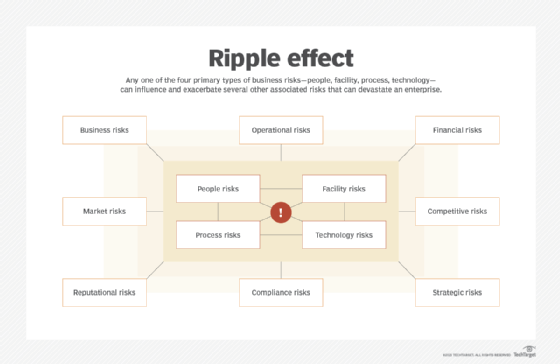
Organizations building a strategic ERM program must have some well-established practices already in place:
- A governance model that includes senior management as well as organizational elements such as security, risk assessment and management, compliance, IT operations, legal, and any other important business stakeholder areas.
- A strategy that incorporates internal policies and standards for all security and risk concerns as well as operational focal areas such as system configuration.
- A procedure that includes internal and external risk threat and vulnerability management to monitor adversaries and risk exposure factors that can potentially influence the risks to the enterprise and its assets.
ERM is a continuous work in progress that needs to grow and evolve, so organizations must be willing to regularly revisit, revise and update all elements of the program.
How is ERM different from traditional risk management?
With traditional risk management processes, individual division heads typically make risk-based decisions. Each functional leader oversees risk management within their own silo. These roles, for example, can fall under the chief technology officer for managing IT-based risks, the treasurer for financial risks, and the chief operating officer for production and distribution risks.
Enterprise risk management, however, requires a more holistic de-siloed approach. Instead of managing risk in a siloed manner, organization must adopt a firm-wide approach to create a portfolio of the most significant risks to an organization or objective. This process generates a top-down enterprise view of all significant risks that can impact an organization.
In larger or more complex organizations, a traditional risk management approach might have risks that do the following:
- Fall between silos. Some types of risks might go unnoticed by other silo leaders.
- Affect silos in different ways. This might lead to the significance of a risk being downplayed.
- Affect other silos. An individual response to a risk or a response from another silo might cause risks in other silos.
What are the components of enterprise risk management?
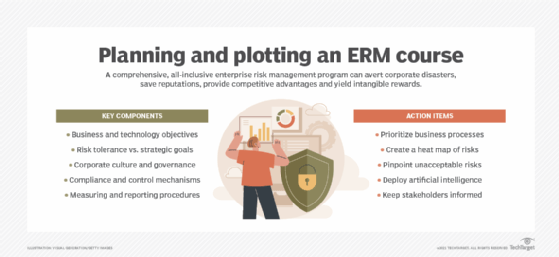
The following components make up ERM:
- Business and IT objectives. An organization's planned strategic initiatives must be included in all risk analysis and decision-making. A migration into cloud services, for example, definitively changes many controls and risk paradigms.
- Risk appetite. To maintain business continuity, an enterprise needs to assess its tolerance in pursuit of strategic goals.
- Culture and governance. Some organizations are generally risk-averse, while others promote risk cultures to pursue strategic initiatives. In addition, internal governance models and collaborative team structures differ widely across enterprises, affecting the way organizations make decisions and implement controls.
- Compliance and control requirements. Internal standards as well as external regulatory and compliance requirements must be factored into risk and control decisions.
- Measurement and reporting. All ERM programs need to provide timely and consistent output to a cross-section of stakeholders, ranging from corporate executives to operations professionals. The metrics used to measure progress as well as the reporting mechanisms and styles are important considerations.
What are the benefits of enterprise risk management?
ERM provides organizations with a host of potential benefits:
- By creating a more risk-focused culture, organizations can integrate risk evaluation into business and IT practices, improving risk management across the organization.
- Enterprises can implement more standardized risk reporting that helps with long-term metrics and measurement.
- Organizations can improve focus and increase their perspective on risk in various categories.
- Companies focusing on risk associated with business objectives might discover more efficient ways to use resources. For example, they might apply limited endpoint security licenses to the most exposed and critical systems.
- Highly regulated organizations can improve the coordination of regulatory and compliance issues across a diverse set of business objectives.
What are the challenges of enterprise risk management?
There are also potential downsides to ERM, including the following:
- Capital and operational expenditures often increase initially because ERM programs can require expensive, specialized software and services.
- ERM initiatives increase emphasis on governance, requiring business units to invest a significant amount of time in risk management.
- Leaders might struggle to reach a consensus on risk severity and metrics across all units of an enterprise.
Who should manage ERM in an organization?
The board of directors and executive management are both in charge of determining what ERM process should be in place as well as how ERM across the organization should function. More specifically, an organization's top management is responsible for designing and implementing the ERM process, while the board of directors is responsible for providing oversight. This oversight includes the understanding and approval of ERM processes and overseeing identified risks to ensure responses are within the stakeholders' risk appetite.
A chief risk officer (CRO) role is also applicable to manage ERM. The CRO is in charge of identifying, analyzing and mitigating risks that impact the organization as a whole. The CRO also ensures that an organization complies with any government regulations. More granular roles in the process fall on other C-level positions and staff.
ERM implementation best practices
Some best practices to follow when implementing ERM include the following:
- Define the program's scope. Identify and prioritize critical business processes and their related risks.
- Develop a blueprint. Use risk heat maps to determine which threats could jeopardize business objectives and critical strategies, share that information, and set controls to offset these risks.
- Devise an action plan. Create a risk treatment plan to pinpoint unacceptable risks and resolve risk gaps.
- Digitally transform. Use artificial intelligence (AI) and other advanced technologies to automate inefficient and ineffective manual processes.
- Monitor and measure. Establish risk profiles and key risk indicators to identify control deficiencies and evaluate how the ERM program is progressing, how it deviates from corporate policies, and how many risk incidents occur.
ERM frameworks
Enterprise risk management frameworks come in many formats. For some companies, adherence to ERM might be mandated by compliance and regulatory requirements. For other businesses, these frameworks might be useful in shaping and defining ERM in its early stages of development and implementation. Some of the more common frameworks include the following:
- ISO 31000 for risk management. ISO 31000:2018 provides documents and principles as well as a framework and a process for managing risk. The framework identifies opportunities and threats as well as methods to effectively allocate resources for risk treatment.
- The National Institute of Standards and Technology (NIST) Risk Management Framework. This framework outlines a seven-step process for organizations to manage information security and privacy risk. It contains a suite of NIST standards and guidelines that support the implementation of risk management programs.
- COSO. The COSO ERM integrated framework defines essential ERM components, key ERM principles and concepts while also providing clear direction and guidance for ERM.
- British Standard 31100. This risk management practice provides a process for implementing and maintaining key functions such as identifying, assessing, responding, reporting and reviewing.
ERM tools and software considerations
When evaluating an ERM tool, organizations should consider a product that provides the following features and attributes:
- Integration. The ERM tool should integrate with other technologies for real-time data exchange.
- Analytics. The right data analytics and reporting features are needed to identify relevant trends, patterns and anomalies in an organization's data sets.
- Customization. The tool should be customizable to align with the organization's risk management strategy.
- Regulatory compliance. Tools should update to changing regulations that might affect business operations.
- Cost effectiveness. Ensure the chosen tool can remain financially viable.
Here are several examples of available ERM tools:
Archer
Recently acquired by private equity firm Cinven, the Archer integrated risk management suite provides tools for enterprise, operational, IT, security and third-party risk management. It's also used for regulatory compliance; management of environmental, social and governance programs; and other risk-related functions.
This platform includes Archer Engage and Archer Insight. Archer Engage is a risk reporting and data collection application that provides a unified user experience for business users and risk management teams. Archer Insight is a risk quantification tool.
AuditBoard
AuditBoard's initial core focus was on streamlining audit and compliance processes for companies required to meet complex regulations. Since then, however, the company has gradually expanded its cloud-based platform into other aspects of risk management.
In July 2023, the company released AuditBoard ITRM for IT risk management, with a focus on IT security risks and support for collaboration between security teams, risk managers and business users.
IBM
IBM OpenPages is an AI-enabled governance, risk and compliance (GRC) platform that supports risk management, regulatory compliance and data governance programs.
IBM acquired OpenPages in 2010 to expand its business analytics offerings into compliance and risk management processes. In 2020, the software was integrated into IBM Cloud Pak for Data, a set of cloud-based tools for organizing, managing and analyzing data.
OpenPages is designed to help organizations centralize siloed risk management initiatives. It includes GRC and ERM tools for managing risks that might appear in IT governance, data privacy and financial controls.
Learn more about the granular roles involved in ERM, such as those in C-level roles.